Let me be honest here: manual processes and never-ending e-mail chains kill productivity. Teams often waste hours chasing approvals, keeping track of spreadsheets, and trying to monitor some tasks. Here’s the good side of it: you don’t have to keep adding tools to solve the problem. Lark allows you to automate, simplify approvals, and complete work faster, all within a single ecosystem. When searching for the best project management tools, Lark does not merely stand as an option; it is the whole platform that makes working together effortless.
This post will reveal seven practical ways to use the tool to help your organization automate tasks and approvals, lessen mundane processes, and focus on outcomes that really matter for their team.
Centralize tasks and track progress with Lark Base
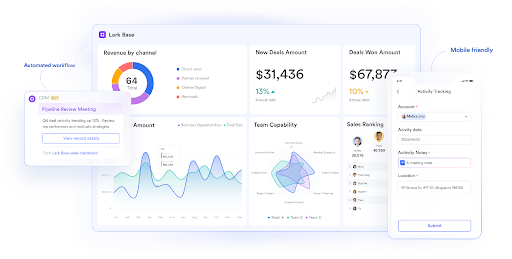
Handling a complex product launch without a central hub, tasks scatter across email, chat, and spreadsheets. That’s where Lark Base comes in. Base allows you to create projects, assign tasks, set deadlines, and track progress—all in one place.
But here’s the clever part: tasks can trigger updates automatically. For example, when a designer marks a task as “completed,” it can automatically notify the project manager and update the relevant milestone in Calendar. This is a real-world example of an automated workflow in action—tasks move forward without anyone manually following up.
Teams no longer waste time checking in on status updates. Instead, Base keeps everyone aligned, deadlines visible, and accountability clear.
Collaborate in real time with Lark Docs
Collaboration bottlenecks often arise when team members work on multiple versions of the same file. Enter Lark Docs, your real-time co-editing platform. Teams can edit simultaneously, leave inline comments, and resolve feedback without endless back-and-forth emails.
For instance, a marketing team drafting a campaign proposal can update visuals, write copy, and incorporate client feedback all in one document. When a change is made, approvals can be triggered automatically in Approvals, so managers review and sign off instantly. This creates a smooth automated workflow where work flows naturally, approvals happen without delay, and no one has to chase anyone down.
Schedule tasks and deadlines with Lark Calendar
Deadlines are meaningless if no one knows about them. Lark Calendar makes scheduling smarter and more automated. Tasks from Base can appear directly in your Calendar, and reminders are sent automatically.
Take Raj, a project manager juggling multiple campaigns. Instead of sending reminders manually or coordinating separate meetings, Calendar automatically links tasks and deadlines to team availability. When deadlines approach, notifications pop up for the responsible members. Combine this with Meetings for real-time discussions, and suddenly, your entire planning process feels effortless. Automating scheduling like this keeps projects on track with minimal manual effort.
Speed approvals with Lark Approval
Delays waiting for approvals can be a productivity hurdle in almost every company. With Lark Approval, requests (including leave requests, budget approvals, and project sign-offs) are submitted directly from Base tasks or Docs. Managers receive immediate notifications, and decisions update related tasks and Calendar events directly.
Here’s a real-world example: an HR manager submits a training budget approval. When they submit the approval, a notification is sent to the Finance manager, who approves the budget, then the relevant Base task updates without anyone needing to follow up with an email. That’s workflow automation at work, in real time, and saving hours per week.
Centralize knowledge with Lark Wiki
When teams work in information silos, this causes delays. Policies, templates, and project guidelines are dispersed, employees spend unnecessary time searching for answers, and sometimes their projects stall. Lark Wiki improves the speed of teams by consolidating their knowledge, so they never have to search for simple answers again.
For example, if a team member creates a new task in Base or a new Doc, they might directly link it to any Wiki pages that contain standard procedures. This makes it less likely that they will be brought back on the project with many questions for approval because they can find this information immediately. By tying tasks, Docs, and approvals to a shared knowledge base, teams move toward a completely automated ecosystem that maximizes productivity and eliminates redundant work.
Automate notifications and reminders with Lark Messenger
Communication lag can be damaging to workflow automation. Lark Messenger is the solution, as it allows you to trigger automated notifications for tasks, requests for approval, and reminders of deadlines.
Consider a Base task that is overdue: Messenger could send an automatic nudge to the person responsible for the task. Similarly, if a Doc is suddenly updated, the relevant people working with you on that project will be notified right away. Even these small automations keep tasks from slipping through the cracks and lessen the amount of follow-up you need to do manually. Messenger really is the one element that pulls the entire workflow together, and whatever it is that you do, your alerts keep moving the people you work with towards the task or project in real-time.
Conclusion
The focus of the workflow automation isn’t about adding more applications, it is about working smarter. With Lark, you can automate tasks, streamline approvals, and tie together communication — all without having to leave a platform.
From Lark Base, to Docs, Calendar, Approval, Wiki, and Messenger every feature is designed to reduce busywork and sharpen focus. Teams don’t need to chase people for updates or approvals manually. Projects move forward, deadlines are met, and employees can be proud of the meaningful work they are doing.
By functioning as a comprehensive business process management software, Lark brings together data, communication, and execution in one connected system. With these seven actionable tips, your team can embrace the full experience of Lark, automate everyday processes, and work smarter, not harder.