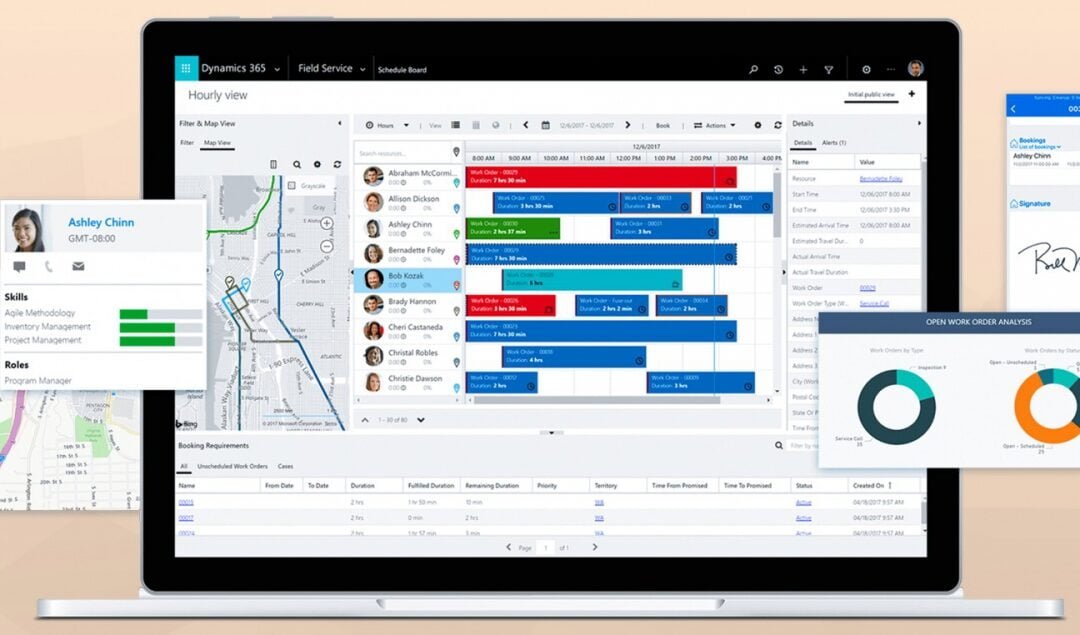
Efficiently managing field operations is essential for keeping customers happy and ensuring smooth business operations. Field Service is a powerful solution designed to optimize field service management, providing the right people and resources in the right place at the right time. Harnessing AI, IoT, and real-time data analytics helps businesses streamline processes, cut costs, and improve service quality.
Field service management plays a crucial role in today’s business landscape. It ensures timely maintenance, fast issue resolution, and proactive service delivery—key factors in customer satisfaction and long-term growth.
Microsoft Dynamics 365 Field Service helps businesses excel in these areas by offering tools for smart scheduling, resource management, and effective customer communication. The platform is designed to better financial impact to minimize downtime, boost first-time fix rates, and enhance service delivery, helping businesses stay ahead in a competitive market.
Key Benefits and Features of Microsoft Dynamics 365 Field Service
Microsoft Dynamics 365 Field Service simplifies work order management, allowing businesses to efficiently create, track, and handle service tasks. Work orders can come from multiple sources, such as customer service cases, sales orders, emails, or even IoT alerts, and can include details such as required tasks, necessary parts, labor, and skill sets.
Scheduling & Dispatch Tools
Flexible scheduling tools make optimizing technician assignments easy. The platform ensures technicians are assigned based on location, skillset, and availability, whether done manually, semi-automatically, or through full automation. A real-time dispatch board gives a clear overview of technician assignments, routes, and traffic conditions, helping improve productivity and reduce costs.
● Communication Tools
Strong communication is the backbone of successful field service operations. With built-in SMS and email notifications, Microsoft Dynamics 365 keeps everyone in the loop: technicians, customers, and service managers, ensuring smooth coordination and real-time updates.
● Asset Management
Dynamics 365’s asset management tools make tracking customer equipment throughout its lifecycle easier. Businesses can monitor performance, schedule preventive maintenance, and manage warranties, helping reduce unexpected downtime and extend asset longevity.
● Inventory & Purchasing
The platform’s inventory management system tracks stock levels, usage, and reordering needs in real-time. This ensures technicians always have the needed parts, reducing delays and improving first-time fix rates.
● Analytics and Tools
With robust analytics and reporting tools, businesses can track key performance metrics like response times, first-time fix rates, and customer satisfaction. These insights drive smarter decision-making and continuous service improvements.
● Preventive Maintenance
With automated maintenance scheduling based on equipment usage and historical data, businesses can take a proactive approach to equipment care. This helps prevent breakdowns, minimize service disruptions, and extend the life of critical assets.
● Time Tracking
Technicians can log their work hours accurately, on-site or in transit. This data is essential for payroll, billing, and job costing, giving businesses valuable insights into labor costs and productivity.
Implementation Procedure of Dynamic 365 Field Service
● Setting Up the Service
The first step in implementing Microsoft Dynamics 365 Field Service is setting up the system to match your business needs. This includes defining workflows, configuring user roles, and ensuring secure access to data. A Microsoft Solutions Partner like DAX Software Solutions can assist with the setup, providing a smooth and efficient implementation.
● Configuring Default Settings
Key settings—such as work order types, service tasks, and pricing structures—need to be configured to align the platform with your operations. These foundational elements ensure the system integrates seamlessly with existing workflows and runs efficiently from day one.
● Personalizing Field Service
Every business has unique needs, and Dynamics 365 Field Service allows for extensive customization. Forms, dashboards, and views can be tailored to fit specific processes. Businesses can also create automated workflows to eliminate repetitive tasks, boosting efficiency and streamlining operations.
● Integration with Dynamics 365 Modules
For a connected, data-driven approach, Dynamics 365 Field Service can be integrated with other Microsoft modules, such as Microsoft Dynamics 365 customer engagement and Sales service. This integration enhances team collaboration, data sharing, service and customer satisfaction.
Utilizing the Field Service Mobile Application
The Field Service Mobile App equips technicians with instant access to work orders, customer details, and asset information. It enables them to complete tasks efficiently without making unnecessary trips back to the office.
The app includes essential features such as GPS navigation, barcode scanning, and the ability to capture photos and signatures. Technicians can conveniently follow step-by-step instructions, review asset details, and check service histories directly from their mobile devices.
With offline functionality, technicians can continue working even in areas without internet access. Any data entered offline is automatically synced once connectivity is restored, ensuring no information is lost.
Real-time updates on job status, inventory levels, and customer interactions help streamline field service management, keeping technicians informed and improving overall coordination.
Improving Technician Efficiency
Real-time dispatch updates ensure technicians always have the latest assignment details, reducing idle time and improving response rates, which leads to greater efficiency and customer satisfaction.
Digital workstations with the Field Service Mobile App, including laptops, tablets, or smartphones, serve as centralized hubs where technicians can efficiently manage their tasks.
Instant access to customer and asset histories through the mobile app makes on-site assessments easier. This allows technicians to conduct thorough evaluations and make well-informed service decisions.
Safety and compliance features provide checklists and guidelines that help technicians follow industry regulations and company policies, minimizing risks and ensuring adherence to safety standards.
Integrating Mixed Reality and AI
Microsoft Dynamics 365 Remote Assist allows technicians to connect with remote experts in real-time through video calls and annotations. This enables them to receive guidance on complex issues, improving service accuracy and efficiency.
The HoloLens mixed reality device overlays digital information onto the physical world, allowing technicians to view holographic instructions and diagrams, perform hands-free tasks, and enhance the precision of their work.
AI-powered Dynamics 365 Field Service capabilities support predictive maintenance, optimized scheduling, and automated work order creation. These features help businesses minimize downtime, improve resource allocation, and enhance overall service quality.
Inventory Management
Microsoft Dynamics 365 Field Service provides powerful real-time inventory management tools that track stock levels. This ensures accurate inventory records, preventing both shortages and overstocking. The system automatically updates inventory as parts are used or restocked, offering a clear and up-to-date view of available resources.
The platform also helps technicians manage the inventory in their vehicles efficiently. The system predicts the required inventory by analyzing past data, job types, and technician usage patterns, ensuring technicians have the necessary parts without carrying excess stock. This reduces delays and enhances service efficiency.
The return process is streamlined, allowing quick and accurate recording of returned items. The system tracks return from initial requests to receipt and restocking, ensuring transparency and accountability. This minimizes the time and effort spent managing returns, improving overall operational efficiency.
Conclusion
Microsoft Dynamics 365 Field Service is a powerful solution for transforming field service operations. Leveraging advanced technologies and robust management tools helps businesses tackle key operational challenges, improve efficiency, and elevate customer satisfaction. With AI-driven scheduling, mobile accessibility, and real-time updates, organizations can streamline service operations, cut costs, and stay competitive in an evolving market.