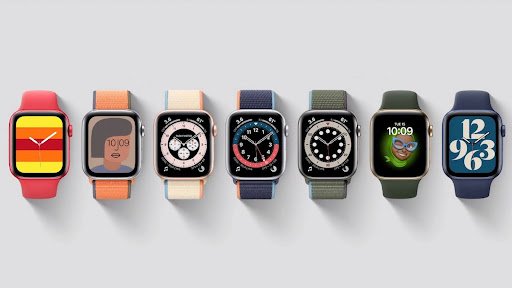
You can’t change the Apple Watch background the way you change wallpaper on an iPhone.
Instead, what Apple calls “backgrounds” are really watch faces.
You can swap them, customize them, and even use your own photos as a background.
Here’s how to do it—and how to make your watch feel more personal.
1. Change Your Watch Face Directly on Apple Watch
The quickest way is right on your wrist:
- Press and hold the current watch face.
- Swipe left or right to browse through options.
- Tap “+” to add a new one.
- Customize colors, complications, and styles.
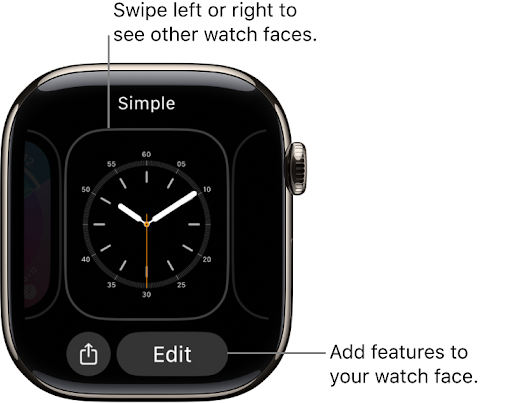
This is the method I use most often when I want a quick refresh—say, switching from a minimalist face during work hours to a fitness-focused face before heading to the gym.
2. Customize with the iPhone Watch App
If you want a bigger screen and more control, use the Watch app on your iPhone:
- Open the Watch app → Tap the Face Gallery tab.
- Browse dozens of designs, from Modular to Portraits.
- Adjust fonts, colors, and complications.
- Sync your selection to your Apple Watch.
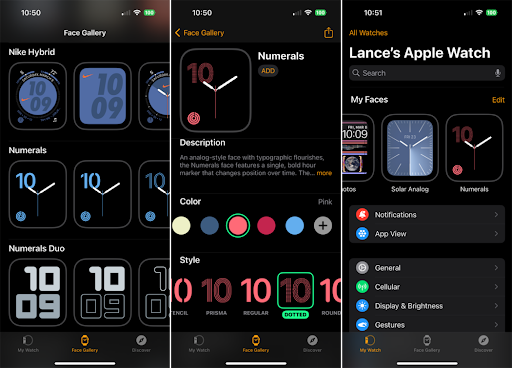
I personally find this easier when I’m experimenting with multiple designs. It’s almost like curating a little wardrobe for my watch.
3. Use Your Own Photos as a Background
This is where personalization gets fun.
- In the Watch app, go to Face Gallery → Photos.
- Choose your favorite images from your iPhone.
- Select how many you want (one photo or an album).
- Sync to your Apple Watch.
Now every time you raise your wrist, you’ll see a memory: maybe a sunset from a trip, your dog smiling at the camera, or a candid moment with family.
I once set my kayaking trip photo as the background—it instantly brought me back to that calm river whenever I checked the time.
Why People Care About Backgrounds
At first glance, changing a watch background may seem trivial. But really, it’s about identity and mood.
- A bold, digital face can feel energetic and sporty.
- A classic analog design can look elegant at dinner.
- A personal photo makes the watch feel less like tech, and more like your watch.
And here’s the subtle secret: it’s not just the face.
The watch band you pair with it transforms the vibe entirely. A casual nylon band with a beach photo feels adventurous, while a sleek leather strap with a black-and-gold watch face feels refined.
👉 If you’d like ideas on elevating your Apple Watch style, check out this post: 3 Ways to Make Your Apple Watch Look More Expensive.
Conclusion
Changing the background on Apple Watch is less about utility and more about expression. It’s a quick way to switch moods, mark a moment, or simply refresh your day.
When combined with the right band, it turns your watch into something deeply personal—sometimes sporty, sometimes elegant, sometimes just fun.
So yes, go ahead—play around with different faces and backgrounds. You may be surprised how much a small change on your wrist can influence the way you feel throughout the day.