Tech
Top Website Design Trends That Will Dominate This Year

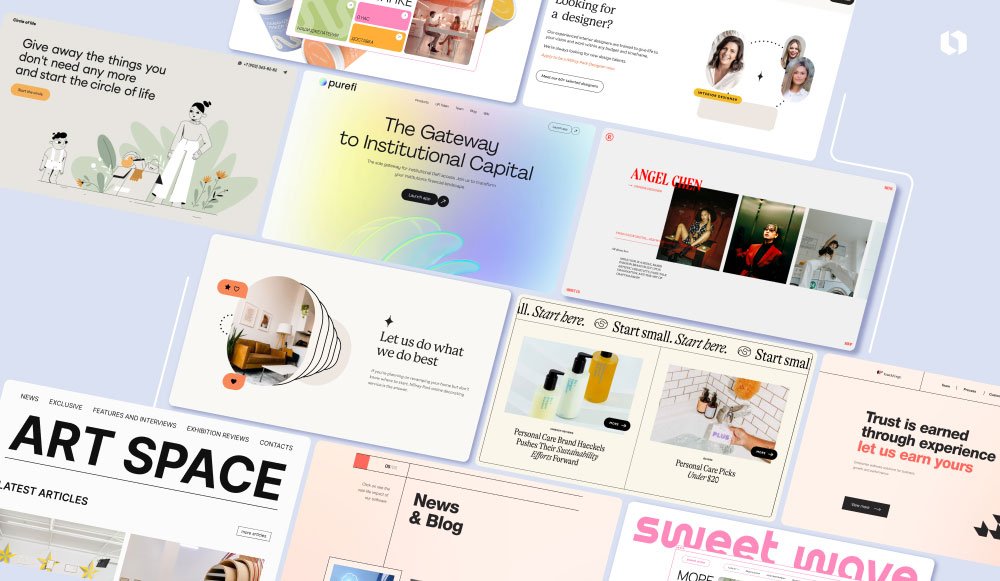
In the fast-paced digital world, staying current with website design trends is critical to engaging users and remaining competitive. As 2025 kicks off, design innovation is not just a luxury—it’s an expectation. From the rise of AI-integrated UX features to immersive design languages, web design is now the cornerstone of user experience. Whether you’re redesigning your brand site or launching a digital product, these upcoming trends are set to redefine your approach to aesthetics and performance. And if you’re looking to bring your ideas to life, don’t hesitate to hire dedicated laravel developers to build interactive and scalable web solutions.
1. The Rise of AI-Integrated UX/UI
AI is becoming an integral part of website functionality. Websites now employ machine learning to personalize user journeys in real-time, offering tailored recommendations and predictive navigation. The shift from static to dynamic interfaces ensures users receive content curated specifically for their needs, increasing engagement and time-on-site.
AI is also automating design elements like color selection, font pairing, and layout adaptation based on visitor behavior. Expect smarter, more responsive designs that learn and adapt to user preferences with each interaction.
2. Minimalism with a Bold Twist
Gone are the days of overly cluttered web pages. Minimalist design remains dominant, but with a twist—bold color contrasts, oversized typography, and unique iconography now make simple layouts more visually compelling. This trend keeps sites clean while still capturing attention through a few impactful design choices.
Whitespace continues to serve as a powerful tool in directing user attention, while simple, bold layouts improve readability across devices.
3. Mobile-First Web Design Takes Priority
With over 60% of web traffic coming from mobile devices, mobile-first design is no longer optional. Designers are now thinking mobile before desktop, ensuring thumb-friendly navigation, scalable images, and fast-loading mobile interfaces.
Responsive grids, dynamic scaling, and gesture-driven navigation patterns are paving the way for more intuitive mobile experiences. This approach is crucial not only for usability but also for SEO rankings.
4. 3D Web Design Elements & Microinteractions
Immersive 3D elements, once limited to gaming and entertainment, are becoming mainstream in web design. 3D icons, interactive animations, and visual product displays enhance storytelling and user engagement.
Complementing this are microinteractions—subtle design responses to user actions (like hover effects, button animations, and scrolling effects). These improve usability while making the website feel alive and responsive.
5. Dark Mode & Soft UI Palettes
Dark mode has moved beyond apps into full website themes, offering users a sleek alternative with reduced eye strain. Websites with toggling dark/light modes enhance accessibility and user satisfaction.
Soft UI (also called Neumorphism) features light, shadowed elements that mimic physical surfaces, offering a tactile and smooth user experience. Together, these styles bring comfort and elegance to modern web aesthetics.
6. Voice-Activated Interfaces
Voice UI isn’t just for smart speakers—websites are beginning to adopt voice-activated search and navigation. This trend supports accessibility and provides an alternative interface for multitasking users.
Expect to see more websites integrating voice commands, especially in eCommerce and service-based platforms, where users can search, buy, or request support hands-free.
7. Cinematic Backgrounds & Video Headers
Cinematic visuals such as high-resolution video headers and scroll-triggered background animations are redefining visual storytelling on websites. These dynamic elements grab attention quickly and create memorable brand experiences.
They’re especially effective in industries like travel, real estate, and fashion, where immersive visuals can trigger emotional responses and drive conversions.
8. Personalized Content & Dynamic Data Visualization
Personalization has evolved far beyond using a visitor’s name. Now, websites dynamically change layout, visuals, and CTAs based on real-time analytics and browsing behavior.
Coupled with dynamic data visualization tools, businesses can present real-time data through engaging charts, graphs, and interactive dashboards—keeping users informed and engaged.
9. Inclusive & Accessible Design Standards
Accessibility is no longer just a checkbox—it’s a core design principle. Modern sites use semantic HTML, ARIA labels, keyboard navigation, and color contrast standards to accommodate all users, including those with disabilities.
Designers are emphasizing inclusivity, ensuring that digital products are usable for everyone, regardless of ability.
10. Scroll-Triggered Storytelling
This trend transforms passive scrolling into a guided storytelling experience. As users scroll, animations, text, and visuals unfold in a choreographed manner, offering a compelling and narrative-driven journey.
It’s ideal for landing pages, portfolios, and educational platforms where storytelling is central to the user experience.
11. Creative Navigation Menus
Website navigation is breaking away from traditional top-bar menus. From hidden navigation drawers and floating icons to animated hamburger menus and voice-activated navigation, sites are becoming more playful and user-centric.
These creative patterns offer fresh ways for users to interact with content while reinforcing brand personality—something Website Digitals played around with in one of their recent experimental site launches.
12. Ethical & Sustainable Design Focus
Designers are now considering the environmental and psychological impact of their websites. Sustainable design involves lightweight code, optimized media, and reduced server load—decreasing carbon footprint.
Ethical design ensures that user data is respected, interfaces are not manipulative (avoiding dark patterns), and the overall digital experience contributes positively to society.
13. Augmented Reality (AR) Integration
AR integration lets users interact with digital elements in their physical space. While still emerging, sectors like retail, interior design, and education are already using AR to preview products or visualize outcomes directly through websites.
This trend boosts decision-making and user satisfaction, offering highly interactive, immersive experiences.
14. Advanced Grid Layouts & Asymmetry
Breaking the conventional grid, designers are embracing asymmetrical layouts, overlapping elements, and broken grids. These give sites a modern, artistic feel and help direct user attention in creative ways.
This trend supports brand uniqueness and storytelling while ensuring usability doesn’t take a back seat.
15. Real-Time Collaboration Features
Websites—especially SaaS platforms—are now including real-time collaboration tools. Think of co-editing documents, shared whiteboards, or interactive forms updated live.
These features enhance user productivity, especially in remote work environments, creating more community-driven, shared digital spaces.
Frequently Asked Questions
1. Why are website design trends important?
They help businesses stay competitive, improve user experience, and meet evolving audience expectations with modern aesthetics and functionality.
2. Is minimalism still a relevant design trend in 2025?
Yes, but it’s now enhanced with bold visual elements like bright colors and strong typography to keep designs engaging.
3. How does AI influence web design today?
AI personalized content, automates design choices, and enhances real-time interactivity, improving both user satisfaction and conversion rates.
4. What is mobile-first design and why is it critical?
It prioritizes mobile devices during the design process, ensuring faster loading, better usability, and higher SEO rankings.
5. Are 3D and AR web elements practical or gimmicky?
When used strategically, they significantly enhance engagement, interactivity, and product visualization.
6. How can I ensure my website is accessible to all users?
Use semantic HTML, keyboard navigation, readable fonts, proper color contrast, and screen reader support to meet accessibility standards.
In the modern world of information overload, finding trustworthy, transparent, and efficient sources of knowledge can be a daunting task. Whether you’re a student, a professional, or just someone looking to learn something new, it’s crucial to have access to a platform that helps you navigate through the noise. This is where Seekde, the innovative digital discovery platform, comes into play.
Seekde is not just another search engine. It is designed to enhance your learning experience by connecting you to reliable sources of information and facilitating smarter, more efficient learning. In this article, we will dive deep into how Seekde works, its unique features, and why it’s the best platform for anyone who values transparency and knowledge quality.
What is Seekde?
Seekde is a cutting-edge platform that simplifies the process of finding reliable and credible information across the web. Whether you’re researching for academic purposes, looking for professional knowledge, or seeking self-improvement resources, Seekde offers a comprehensive search engine that connects you to the right resources quickly and effectively.
Unlike traditional search engines, which often return millions of results, many of which may be irrelevant or unreliable, Seekde focuses on delivering curated, high-quality content that is verified, trustworthy, and relevant to your needs.
Key Features of Seekde
1. Reliable and Transparent Knowledge
One of the biggest challenges in today’s digital landscape is ensuring the accuracy and reliability of information. Seekde solves this problem by only providing verified content from trusted sources. Whether you’re conducting research or simply learning for personal growth, you can trust that the information you find on Seekde is credible and fact-checked.
2. Smarter Connections
Seekde’s unique algorithm helps you connect to the right sources faster and more accurately than traditional search engines. It identifies the most relevant content based on your query, and presents it in an organized, user-friendly way. This saves you time by eliminating the need to sift through pages of irrelevant results.
3. Customizable Learning Paths
Whether you’re learning a new language, mastering a skill, or exploring a new topic, Seekde helps you create a personalized learning journey. You can build a customized path based on your interests, skills, and goals. Seekde’s platform curates learning materials from a variety of formats – articles, videos, podcasts, and e-books – so you can learn in the way that suits you best.
4. Smart Recommendations
Seekde doesn’t just help you find information; it also suggests related content that might interest you. As you interact with the platform and provide feedback on the content you consume, Seekde fine-tunes its recommendations, ensuring that your learning experience becomes more accurate and efficient over time.
5. Community and Collaboration
Learning is always better when shared with others. Seekde offers a community-driven approach where users can interact, share insights, and collaborate on projects. Whether you want to join discussion groups, participate in forums, or connect with fellow learners, Seekde encourages knowledge-sharing and collaboration.
Why Choose Seekde Over Other Platforms?
1. Trustworthy Information
In today’s digital age, it’s easy to be overwhelmed by the sheer amount of content available online. However, much of it is either inaccurate or misleading. Seekde prioritizes the reliability of information, ensuring that users are only exposed to verified and credible content. This makes it an invaluable tool for anyone who values truth and transparency in their learning journey.
2. Efficient Learning Process
Traditional search engines often deliver results based on algorithms that prioritize keyword matches rather than relevance or quality. This means you often have to sift through irrelevant content before finding what you’re looking for. Seekde, on the other hand, uses advanced algorithms designed to surface the most relevant and valuable information. As a result, users can access content that is not only accurate but also highly relevant to their learning goals.
3. User-Friendly Interface
Seekde’s interface is designed with simplicity and ease of use in mind. The platform is intuitive, allowing users to easily navigate through its features and access the information they need without hassle. Whether you’re a tech expert or a beginner, Seekde’s clean and simple layout makes it easy for anyone to start learning right away.
4. Personalized Experience
Learning is not a one-size-fits-all journey. Everyone has different goals, interests, and learning styles. Seekde understands this, which is why it offers a highly personalized experience. The platform tailors content recommendations and learning paths based on your preferences, ensuring that you stay engaged and motivated throughout your learning process.
How Seekde Works
1. Search Functionality
At its core, Seekde functions as a powerful search engine. When you enter a query, Seekde processes your request and scours the web for content that meets your criteria. However, instead of presenting an overwhelming list of results, Seekde filters the content based on its credibility, relevance, and the trustworthiness of the source.
2. Curated Content
Once Seekde identifies the relevant information, it curates the best possible resources for you. This could include scholarly articles, research papers, news articles, and even multimedia content such as videos and podcasts. The platform ensures that all content is easy to digest and provides sources that are recognized for their authority and expertise.
3. Content Discovery and Learning Paths
In addition to providing search results, Seekde goes a step further by offering personalized content discovery and learning paths. By tracking your progress and understanding your interests, Seekde recommends new content that aligns with your learning journey. This feature helps you discover resources you may not have otherwise encountered, opening up new opportunities for knowledge growth.
Seekde for Professionals: Why It’s Perfect for Career Development
For professionals looking to stay ahead in their careers, Seekde is an invaluable tool. It not only offers educational resources but also connects users to the latest industry trends, news, and professional development courses. Whether you’re in business, technology, marketing, or any other field, Seekde helps you stay on top of the latest developments and grow your skills.
Educational Institutions Can Benefit From Seekde Too
Seekde is an excellent resource for educational institutions looking to provide students with accurate and credible information. By using Seekde, institutions can offer students a reliable digital learning platform that enhances their research skills and helps them access high-quality educational content.
Common Uses of Seekde
Academic Research: Whether you’re a student or a researcher, Seekde helps you find peer-reviewed articles, academic journals, and other scholarly content to support your work.
Skill Building: Seekde is perfect for self-learners who want to build new skills, from programming and design to communication and leadership.
Professional Development: Stay ahead in your career by accessing up-to-date industry trends, reports, and professional resources tailored to your field.
Collaborative Learning: Participate in group discussions, share resources, and engage in knowledge-building activities with other Seekde users.
Seekde vs. Traditional Search Engines
When comparing Seekde with traditional search engines like Google or Bing, there are a few key differences that make Seekde stand out:
Quality over Quantity: While traditional search engines flood users with results, Seekde prioritizes quality and relevance. This makes it easier to find what you need without wading through endless pages of irrelevant content.
Verified Sources: Traditional search engines don’t always guarantee the reliability of the sources they present. Seekde, however, ensures that all content is from trusted and verified sources.
Smarter Recommendations: Seekde offers personalized recommendations based on your learning goals, ensuring that you discover valuable content aligned with your interests.
The Future of Learning with Seekde
As the world of digital education continues to evolve, Seekde is poised to revolutionize the way we discover and consume knowledge. With its focus on transparency, quality, and smarter connections, Seekde is changing the landscape of online learning and information discovery. Whether you’re a student, professional, or lifelong learner, Seekde offers an innovative solution to accessing the information you need to thrive in today’s fast-paced world.
Conclusion: Why Seekde Is the Future of Smarter Learning
Seekde is more than just a platform—it’s an intelligent tool that empowers learners and professionals alike to make informed decisions, access high-quality content, and develop valuable skills. Its user-centric approach, coupled with a focus on verified sources, makes it the go-to digital discovery platform for anyone serious about learning.
So, what are you waiting for? Join Seekde today and take the first step towards smarter, more efficient learning. Whether you’re a student, a professional, or a lifelong learner, Seekde has something valuable for you.

Imagine harnessing the sun’s energy, transforming sunlight into clean power with remarkable efficiency. Welcome to the world of HMS Photovoltaik! This innovative technology has revolutionized solar energy conversion, making strides in sustainability and efficiency. With a rich history rooted in ingenuity, HMS Photovoltaik stands as a beacon for industries and households alike seeking reliable energy solutions.
As we delve deeper into this fascinating subject, you’ll discover how photovoltaic technology works its magic, why it outshines traditional solar panels, and what key components make up an effective HMS Photovoltaik system. Whether you’re considering an upgrade or exploring options for your first installation, there’s something here for everyone eager to embrace renewable energy. Let’s explore how HMS Photovoltaik is paving the way toward a brighter future powered by sunshine!
What is photovoltaic technology and how does it work?
Photovoltaic technology is a method that converts sunlight directly into electricity. It harnesses the power of solar energy using special materials known as semiconductors.
When sunlight hits these semiconductors, it excites electrons, creating an electric current. This process takes place in solar cells, which are the building blocks of photovoltaic systems.
The most common semiconductor used is silicon. It’s abundant and efficient at capturing sunlight. When multiple solar cells work together in panels, they can generate significant amounts of power.
In essence, photovoltaic technology transforms light energy into electrical energy seamlessly. The generated electricity can be used immediately or stored for later use via batteries or other storage systems. This innovation plays a crucial role in promoting renewable energy sources and reducing reliance on fossil fuels.
Advantages of HMS Photovoltaik over traditional solar panels
HMS Photovoltaik systems stand out due to their innovative design and efficiency. Unlike traditional solar panels, they utilize advanced materials that enhance energy conversion rates. This means more power generation even in low-light conditions.
Durability is another key advantage. HMS Photovoltaik modules are engineered to withstand extreme weather, ensuring a longer lifespan compared to conventional options. This reliability translates into reduced maintenance costs over time.
Additionally, these systems often feature streamlined aesthetics, making them an appealing choice for both residential and commercial applications. Homeowners can enjoy the benefits of clean energy without sacrificing curb appeal.
Moreover, HMS Photovoltaik technology is designed with sustainability in mind. The production process minimizes waste and environmental impact, aligning with eco-friendly values while delivering high performance efficiently.
Key components of HMS Photovoltaik system
The HMS Photovoltaik system comprises several essential components that work together to harness solar energy efficiently. At the heart of it all is the photovoltaic (PV) module, which converts sunlight into electricity. These modules are designed using advanced materials for optimal performance.
Next, we have the inverter. This device plays a crucial role in converting direct current (DC) generated by PV modules into alternating current (AC), making it usable for homes and businesses.
Additionally, a robust mounting structure supports the entire system, ensuring stability and proper positioning towards the sun.
Energy storage solutions like batteries are also integral to many HMS systems. They allow users to store excess energy produced during peak sunlight hours for later use.
Monitoring systems provide real-time data on performance, enabling efficient management of energy production and consumption. Each component works harmoniously to maximize efficiency and sustainability in energy generation.
How to choose the right HMS Photovoltaik system for your needs
Choosing the right HMS Photovoltaik system starts with understanding your energy needs. Assess your average power consumption to determine how much energy you require. This step is crucial for selecting a system that meets your requirements without overspending.
Next, consider the space available for installation. Different systems have varying sizes and efficiencies, so it’s essential to match a solution with your roof or land area.
Budget plays an important role too. Explore various configurations and financing options to find one that fits comfortably within your financial plan.
Don’t forget about local regulations and incentives. Some regions offer tax credits or rebates for solar installations, which can significantly reduce costs.
Consult with experts in HMS Photovoltaik technology. They can provide valuable insights tailored to your specific situation and help guide you through the selection process effectively.
Case studies: successful implementation of HMS Photovoltaik in different industries
HMS Photovoltaik has made significant strides across various sectors, showcasing its versatility and efficiency.
In the agricultural sector, a leading farm in Germany integrated HMS systems to power irrigation pumps. The results? A remarkable reduction in energy costs while enhancing crop yields through consistent watering schedules.
The automotive industry also embraced HMS technology. An electric vehicle manufacturer utilized solar panels on their factory rooftops, generating clean energy for production lines. This move not only cut expenses but aligned with eco-friendly initiatives.
Retail spaces are turning towards HMS Photovoltaik too. A popular shopping mall installed these solar solutions to offset electricity usage, leading to significant savings that were redirected toward community programs.
These case studies highlight how diverse industries benefit from adopting HMS Photovoltaik technology, paving the way for sustainable practices while enjoying financial advantages. Each implementation tells a story of innovation and environmental responsibility.
The future of HMS Photovoltaik and advancements in solar energy technology
The future of HMS Photovoltaik is bright and full of potential. As technology evolves, we can expect even more efficient solar energy solutions that harness sunlight in innovative ways.
Emerging advancements focus on increasing conversion rates and reducing costs. Researchers are exploring new materials and designs that promise to enhance performance while being environmentally friendly.
Integration with smart grids will also play a crucial role. By connecting HMS Photovoltaik systems to intelligent networks, users can optimize energy consumption and storage seamlessly.
Energy storage technologies are advancing as well. Innovations like solid-state batteries aim to store solar power more efficiently, making it accessible during non-sunny periods.
Moreover, the push for sustainability will lead to greater adoption across various sectors. From residential homes to large-scale industrial applications, HMS Photovoltaik stands poised at the forefront of renewable energy transformation.
Conclusion
HMS Photovoltaik represents a significant leap forward in solar energy technology, blending efficiency and innovation. Its history reflects a commitment to harnessing the sun’s power more effectively than traditional systems. By understanding how photovoltaic technology works, potential users can appreciate the advantages HMS offers.
With its superior performance metrics, key components that enhance reliability, and customized solutions for varied needs, HMS Photovoltaik stands out in the renewable energy landscape. The case studies of successful implementations across different industries highlight its versatility and effectiveness.
As advancements continue in solar energy technology, HMS Photovoltaik is poised to evolve further. This journey promises an exciting future where sustainable energy becomes even more accessible and efficient for everyone seeking to make a positive impact on their environment while enjoying cost savings through reduced electricity bills or enhanced operational efficiencies. Embracing this innovative approach could be your next step toward a greener tomorrow.
Welcome to the future of digital solutions with Awius! As businesses navigate an increasingly complex online landscape, finding a reliable partner for innovation is essential. Awius stands out as a cutting-edge platform designed to streamline operations and enhance your overall digital experience. Whether you’re a small startup or an established enterprise, Awius has something tailored just for you. Dive in, explore what makes this platform unique, and discover how it can transform your business journey into one filled with efficiency and success.
The Mission and Vision of Awius
Awius is driven by a clear mission: to empower businesses through innovative digital solutions. The platform focuses on harnessing technology to streamline operations and enhance productivity.
The vision of Awius extends beyond mere service delivery. It aims to foster an ecosystem where creativity meets functionality, allowing clients to thrive in the digital age.
By prioritizing user experience and adaptability, Awius seeks to redefine how organizations approach their challenges. They understand that every business has unique needs, which drives their commitment to tailor solutions accordingly.
With a forward-thinking mindset, Awius envisions a future where technology not only simplifies tasks but also inspires growth and transformation across various sectors. This ambition reflects their dedication to making impactful contributions in the world of digital services.
Services Offered by Awius
Awius offers a diverse range of digital solutions tailored to meet the needs of modern businesses. From cutting-edge web development to innovative mobile applications, clients can find tools that elevate their online presence.
The platform also provides robust digital marketing services. This includes SEO, content creation, and social media management designed to drive traffic and engagement.
E-commerce integration is another critical service offered by Awius. Businesses seeking to expand their reach can leverage seamless online shopping capabilities.
Moreover, Awius delivers data analytics services that help organizations make informed decisions based on real-time insights. With these powerful tools at your disposal, transforming your business operations becomes easier than ever.
Custom software development rounds out the offerings, allowing companies to create bespoke solutions perfectly aligned with their objectives and workflows.
Key Features and Benefits of Using Awius
Awius stands out with its intuitive user interface, designed for seamless navigation. Users can quickly access tools without any steep learning curve.
The platform offers real-time analytics, empowering businesses to make data-driven decisions on the fly. This feature enhances operational efficiency and helps in tracking progress effortlessly.
Collaboration is simplified through integrated communication tools. Teams can work together from anywhere, sharing ideas and feedback instantly.
Moreover, Awius provides customizable solutions tailored to specific industry needs. This flexibility ensures that clients receive exactly what they require without unnecessary features.
Security is a top priority as well; robust measures protect sensitive information, giving users peace of mind while focusing on their projects.
With regular updates and enhancements based on user feedback, Awius remains at the forefront of technological advancements. It’s not just about today; it’s about preparing for tomorrow’s challenges too.
Success Stories of Clients using Awius
Awius has transformed the way businesses operate, and numerous clients can attest to its impact. One notable success story comes from a mid-sized e-commerce company that faced challenges with inventory management. After integrating Awius into their operations, they experienced a 30% increase in efficiency. Real-time tracking features allowed them to optimize stock levels seamlessly.
Another client, a healthcare provider, utilized Awius for patient data management. The platform streamlined communication between departments and reduced administrative errors significantly. They reported improved patient satisfaction scores as a result.
Even startups have found value in Awius. A tech startup leveraged its analytics capabilities to identify market trends quickly, leading to strategic pivots that doubled their revenue within six months.
These stories highlight how versatile and effective Awius is across various industries, enabling companies not just to survive but thrive in competitive landscapes.
How to Get Started with Awius
Getting started with Awius is a straightforward process designed for users of all skill levels. First, visit the official Awius website to explore the platform’s offerings and features.
Once you’re familiar with what Awius provides, create an account by filling out a simple registration form. This step takes just a few minutes and helps you unlock access to all available tools.
After that, take advantage of the comprehensive onboarding tutorials. These guides walk you through essential functionalities and help you familiarize yourself quickly.
Don’t hesitate to reach out to customer support if you encounter any challenges or have questions about specific services. They are ready to assist and ensure your experience is seamless.
Start experimenting with various features immediately after signing up. This hands-on approach will give you confidence in navigating the platform effectively while discovering how it can best serve your needs.
Future Plans for Awius
Awius is poised for exciting growth in the coming years. The team is actively exploring innovative technologies to enhance user experience. This includes integrating artificial intelligence and machine learning capabilities.
Plans are also underway to expand service offerings, aiming to cater to a broader audience. Awius seeks partnerships with other tech firms, fostering collaboration that drives creativity and efficiency.
The platform will prioritize sustainability as it scales operations. Eco-friendly practices will become integral, ensuring long-term viability while addressing environmental concerns.
Continuous improvement remains at the core of Awius’s strategy. Regular updates based on user feedback will help refine services and tools, ensuring they meet evolving market demands effectively.
With these initiatives, Awius aims not just to keep pace but lead in digital solutions innovation. The journey ahead promises thrilling developments for both the company and its users alike.
Conclusion
Awius stands out as a transformative platform in the digital solutions space. Its commitment to innovation and user satisfaction drives every aspect of its operations. By focusing on quality services, it empowers businesses to thrive in an ever-evolving landscape.
With features designed for flexibility and efficiency, clients can rest assured that they are equipped with tools tailored to their needs. From streamlined workflows to enhanced customer engagement strategies, Awius delivers measurable results that resonate.
Success stories from various sectors highlight how Awius has tackled unique challenges and helped businesses achieve remarkable growth. These testimonials reflect the platform’s reliability and potential for positive impact.
Getting started with Awius is straightforward. The onboarding process is designed to be user-friendly, ensuring that new clients can quickly understand how to leverage the full range of offerings available.
As Awius continues to innovate, future plans include expanding service offerings and enhancing existing features based on client feedback. This approach ensures that users not only keep pace but also stay ahead of industry trends.
For those looking for cutting-edge solutions combined with exceptional support, exploring what Awius has to offer could be a pivotal step toward achieving business goals. Embracing this technology may very well set you on a path towards unprecedented success.

Why Modern Homeowners are Moving Away from Manual Pool Maintenance

6 Best Movies for Travel Lovers